In the ever-evolving world of gaming, having the right setup can make all the difference. A powerful gaming PC not only enhances your gaming experience but also ensures that you can play the latest titles at high settings without any lag. This guide will walk you through the essential components, considerations, and resources needed to build your ultimate gaming PC.
Understanding Your Needs
Before diving into the specifics of building a gaming PC, it’s crucial to understand your gaming needs. Are you a casual gamer, or do you play competitive esports? Different gaming styles require different hardware specifications. For instance, a gamer who plays first-person shooters may prioritize a high refresh rate monitor and a powerful graphics card, while a role-playing gamer might focus more on a robust CPU for better performance in resource-heavy games.
Furthermore, consider your budget. Building a gaming PC can range from a few hundred to several thousand dollars. Create a budget that reflects your needs and stick to it. This will help narrow down your options and prevent overspending on unnecessary components.
Choosing the Right Components
Once you have a clear understanding of your needs and budget, it’s time to select the components for your gaming PC. The main parts you need to consider include the CPU, GPU, RAM, storage, motherboard, power supply, and case.
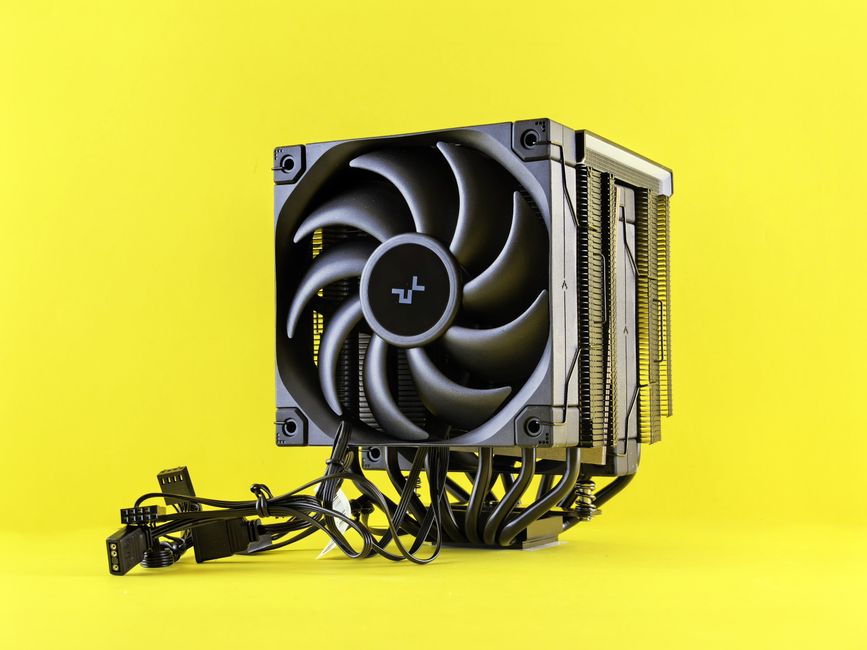
The CPU (Central Processing Unit) is the heart of your PC. For gaming, a multi-core processor is recommended. Popular choices include AMD Ryzen and Intel Core series. The GPU (Graphics Processing Unit) is equally important, as it directly affects your gaming performance. NVIDIA and AMD are the leading brands in this space, with a wide range of options available for different budgets.
Additionally, ensure you have enough RAM—at least 16GB is recommended for modern gaming. Storage is another key factor; consider a combination of SSD for fast load times and HDD for additional storage. The motherboard should be compatible with your CPU and have enough slots for future upgrades. Lastly, don’t overlook the power supply; it should provide sufficient wattage for all your components.
For those unsure where to start, using a gaming PC builder tool can simplify the selection process by allowing you to see compatibility and prices for each component.
Assembly: Putting It All Together
Once you have all the components, it’s time to assemble your gaming PC. This can be an intimidating process for beginners, but there are plenty of resources available, including video tutorials and community forums. Start by installing the CPU and RAM onto the motherboard before placing it into the case. Next, install the power supply and connect all the necessary cables.
Installing the GPU comes next; ensure it is securely seated in the PCIe slot. After everything is connected, double-check your work to avoid any issues during the first boot. Once powered on, enter the BIOS to ensure all components are recognized and configured correctly.
Installing an Operating System and Drivers
After successfully assembling your gaming PC, the next step is to install an operating system. Most gamers prefer Windows for its compatibility with a wide range of games. You can install Windows via a USB drive or DVD. After the OS installation, make sure to install the latest drivers for your GPU and other components. Keeping your drivers updated ensures optimal performance and stability.
Don’t forget to install essential software, such as anti-virus programs and any gaming platforms you use, like Steam or Epic Games Store. This will prepare your new gaming PC for the best possible experience.
Future-Proofing Your Build
As technology advances, so do the requirements for gaming. To ensure your gaming PC remains relevant for years to come, consider future-proofing your build. This can be done by selecting components that allow for upgrades, such as a motherboard with multiple RAM slots or a power supply with extra wattage capacity.
Additionally, keep an eye on emerging technologies, such as ray tracing and AI-enhanced gaming. Being aware of these trends can help you make informed decisions when upgrading your system. Regularly assess your performance and determine when it’s time to upgrade specific components to maintain superior gaming experiences.
Conclusion
Building your own gaming PC can be a rewarding experience that not only saves money but also allows for a customized setup tailored to your preferences. By understanding your needs, selecting the right components, and following the assembly process, you can create a powerful machine that elevates your gaming experience. Remember to keep your system updated and be prepared to adapt to the ever-changing gaming landscape. With the right approach, your custom-built gaming PC can provide years of enjoyment and performance.
About the Author